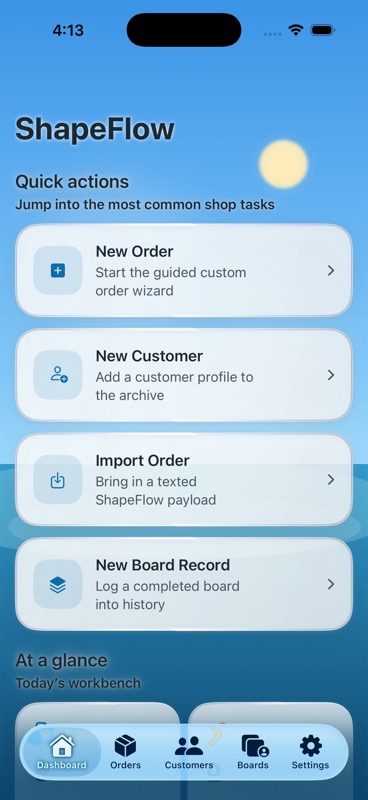
01 · Shaper dashboard
Orders, customers, boards, and quick actions for the day-to-day shaping workflow.
ShapeFlow gives shapers a protected local workspace and gives surfers a clean personal experience for orders, quiver tracking, and board photos. Share custom surfboard orders with your shaper via text, email, or wireless.
Orders, customers, boards, and quick actions for the day-to-day shaping workflow.
ShapeFlow is designed for shared shop devices and real custom-order conversations. Shapers get the operational side of the app. Surfers get their own profile, order history, and quiver tools. The archive stays local, structured, and recoverable.
Surfer mode stays personal. Shaper mode can be protected with Face ID or the device passcode on shared shop hardware.
Surfers can keep a personal board inventory, add photos, and revisit specs without needing the shaper archive.
Single orders travel as `.sfo` files. Full local archives, including board photos, export and restore as `.sfb` backups.
The app has grown well beyond the original order-wizard concept. Today it covers the shop workflow, the surfer experience, board-photo archives, safer shared-device use, and full backup and restore.
Capture custom orders, manage customer records, store completed boards, and keep the bay-side workflow searchable on-device.
Surfers get a free personal quiver with their own board inventory, past orders, and a private profile flow designed for shared devices.
Add one local photo per board or quiver entry, keep thumbnails in the archive, and restore those photos with full backups.
Send a single structured order file through Files, Messages, AirDrop, or Mail instead of dumping specs into raw text threads.
Export the complete local archive, including orders, boards, quiver entries, board photos, and linked surfer profile data stored on that iPhone.
Turn on Face ID or device-passcode protection for Shaper Mode before handing an iPhone or iPad to a customer in the shaping bay.
The app now treats shaper and surfer use as distinct roles instead of one blurry archive. That keeps the shop organized and makes shared-device use feel more trustworthy.
Run the production side of the custom-order process without losing customer history or board context.
Build better custom orders, keep your own board history, and store a photo-backed quiver on the same install.
ShapeFlow uses two file types on purpose. One is for moving a single order cleanly. The other is for protecting the full archive on the device, including photos and role-linked data.
Use this when a surfer or assistant wants to send one structured order into the shaper workflow.
Use this when the device owner wants to export or restore the full local archive, including board photos and quiver data.
Shaper Mode can stay locked behind Face ID or the device passcode, while surfer mode remains available for customer-facing use.
Open Shaper Mode for the shop workflow or Surfer Mode for the customer-facing side of the app.
Build a custom order, add a board record, or store a personal quiver board with notes and a photo.
Move one order with `.sfo`, not a screenshot pile or a long message thread that loses structure.
Export a full `.sfb` backup so the local archive, board photos, and quiver history are recoverable later.
No. ShapeFlow is designed to work locally on iPhone without requiring a ShapeFlow account in the current release.
Yes. Surfer mode includes a free My Quiver experience for personal board inventory, order history, and board photos on that device.
`.sfo` is a single structured order file. `.sfb` is a full local backup file that can restore the archive, quiver boards, and board photos on the device.
Yes. Shaper Mode can be protected with Face ID or the device passcode so the shop workspace stays locked on shared devices.
Yes. Full `.sfb` backups include board records, surfer quiver boards, and the local board photos saved on that iPhone.
No. Backups restore local app data. App Store purchase entitlement still restores separately through Apple’s purchase system.
The ShapeFlow support center is live. If you have questions about shared-device use, order imports, full-device backups, or launch readiness, send them to the support inbox.
Support contact: support@shapeflow.app